The G1 Garbage Collector
Introduction
The Garbage-First Garbage Collector (G1) is the default garbage collector on the JVM as of JDK 27, with JEP 523: Make G1 the Default Garbage Collector in All Environments, which made it the default in all environments. It had been the default garbage collector in "server" environments since JDK 9, with JEP 248: Make G1 the Default Garbage Collector. G1 seeks to balance throughput and latency and is a good option for many workloads. In this article, we will cover a brief history of G1, its key design concepts, and how to use it.
A Brief History of G1
G1 was originally introduced in JDK 6u14 as an experimental feature, promoted to a standard feature in JDK 7u4, and designated the default garbage collector in JDK 9, taking over that role from ParallelGC. While G1 has taken over the role of default garbage collector from Parallel, it was originally introduced to replace the CMS (Concurrent-Mark-Sweep) Garbage Collector, which was deprecated in JDK 9 and removed in JDK 14.
At the time of its introduction, G1 was designed for server environments. Systems using G1 were expected to have multiple processors and large amounts of system memory (tens of GB) available. Continued development of G1 has reduced its system requirements, and now G1 can provide good performance even in resource constrained environments with only a single CPU and less than 2 GB of available system memory. This is why, as of JDK 27, it is the default garbage collector across all system configurations.
In garbage collector design, the three primary design constraints are throughput, latency (pause time), and memory footprint. G1 seeks to maintain a balance between latency and throughput, rather than heavily optimizing for either. By comparison, ParallelGC primarily focuses on maximizing throughput, and ZGC focuses on minimizing latency. G1 also aims for more consistent pause times than the CMS collector it replaced.
As of the writing of this article, 12 JEPs relating to G1 have been delivered since JDK 8, with more changes planned for the future. Continued development has steadily improved G1's throughput, latency, and memory footprint.
G1 Technical Overview
G1 is a generational, incremental, parallel, mostly concurrent, stop-the-world, and evacuating garbage collector. For an explanation of each of these terms, check the Garbage Collection in Java article on dev.java. This section covers some of the key design characteristics of G1.
As mentioned in the previous section, G1 was originally designed with large "server-like" environments in mind. G1 is capable of efficiently marshalling the resources of systems with dozens of cores and addressing heaps measured in tens of GB.
G1 Heap Layout
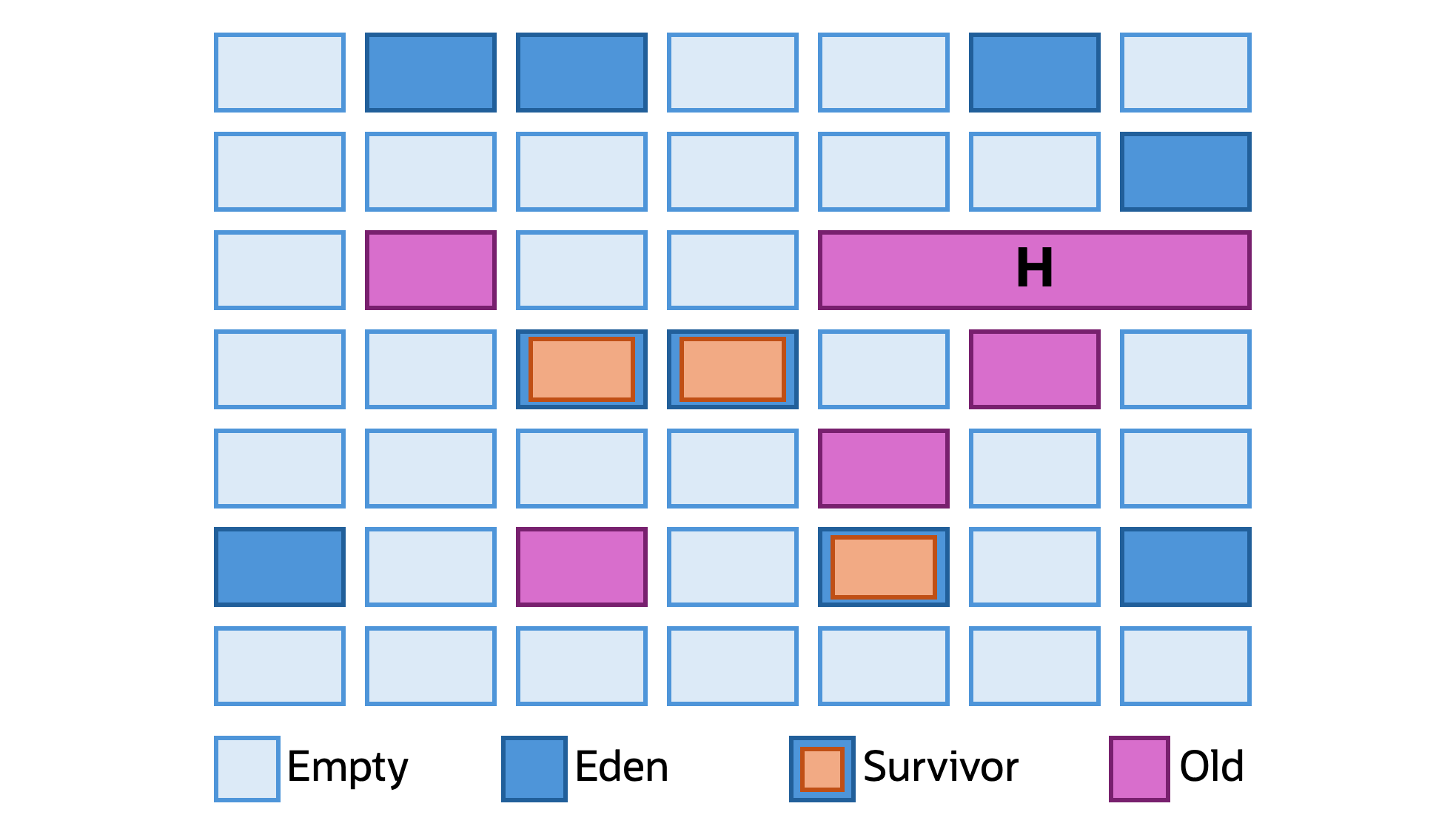
Figure 03-01: Simplified representation of the G1 heap layout
G1 divides the heap into a set of regions (increments) of uniform size. Figure 03-01 is a simplified example of what the G1 heap space would look like. The size and number of regions, unless otherwise configured, are based on internal heuristics, with the overall heap size being the primary influence on both. These regions are then divided up into eden, survivor, old, and humongous regions.
Eden and survivor regions are both part of the "young" generation. On creation, an object is placed in an eden region. If that object survives a collection, it is evacuated (copied) into a survivor region. Unreachable objects are not deleted individually; rather, the region they are a part of is considered empty and is eligible for reuse by G1. Surviving objects, if they remain reachable, will be evacuated to a new survivor region on subsequent collections. If an object survives enough collections, based on internal heuristics unless otherwise configured, it will be evacuated to an old region, which is checked less frequently.
A humongous region is a contiguous space of one or more regions, reserved for a single "humongous" object. An object qualifies as "humongous" if it's larger than half the size of a single region. Humongous objects bypass the eden and survivor regions and are treated as equivalent to an old region by G1.
G1 Garbage Collection Cycle
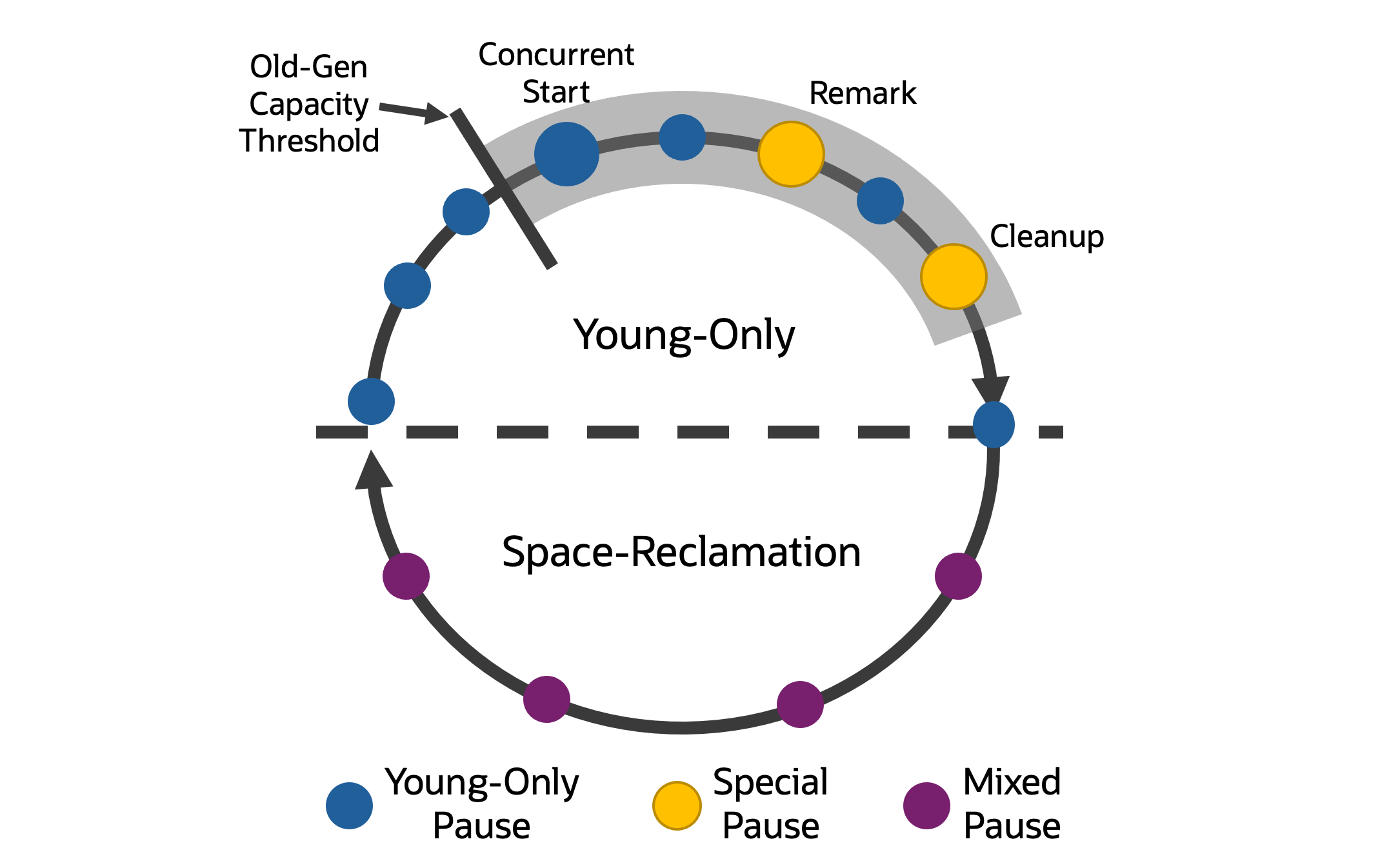
Figure 03-02: Simplified representation of the G1 garbage collection cycle
The G1 garbage collection cycle (GC cycle) consists of both stop-the-world and concurrent behavior, both of which can run in parallel. Again, check Garbage Collection in Java for definitions of these terms. Figure 03-02 is a simplified visualization of the G1 GC cycle and will help to contextualize this section.
At a high level, the G1 GC cycle consists of two phases: Young-Only and Space-Reclamation. G1 will start in the Young-Only phase, which, as the name suggests, means only young regions are collected. In G1, when a collection happens, the application is paused while G1 evacuates objects to new regions or performs other GC work.
The concurrent behavior of G1 is primarily concerned with determining which objects in old regions are still active. The concurrent phase can be broken into three distinct parts and starts when old-generation occupancy reaches a threshold.
Concurrent Start is the first step in the concurrent phase and is a special pause. During this pause, normal evacuation of young regions still occurs, and G1 also initiates concurrent marking of old-generation regions to determine which objects are still reachable. It is also possible that G1 determines there is no need to follow through with marking, in which case a Concurrent Mark Undo pause occurs, and the Young-Only phase continues.
Remark is the second step in the concurrent phase. This is a special pause where no evacuation of young regions happens. Instead, during this pause, G1 finalizes concurrent marking and performs other work, such as reference processing, class unloading, and reclaiming empty regions. Between this phase and Cleanup, G1 will concurrently calculate information to be used during the Space-Reclamation phase.
Cleanup is the third and final step in the concurrent phase. This is also a special pause where no evacuation of young regions happens. During this pause, G1 determines if it should proceed to the Space-Reclamation phase. If a Space-Reclamation phase is determined to be necessary, the Young-Only phase will complete with a single Prepare Mixed young collection.
The Space-Reclamation phase consists of multiple mixed collections: collections where young and old regions are evacuated. G1 uses an efficiency algorithm to determine which old regions to collect first. A major factor in this algorithm is the amount of garbage in each old region, as regions with more garbage are more likely to yield large amounts of space. This is what "Garbage-First" in the G1 name refers to: it will reclaim the regions with the most garbage first.
The Space-Reclamation phase ends when G1 determines that evacuating more old regions is no longer worth the effort. At this point, G1 shifts back to the Young-Only phase.
For more technical details on G1, check the Garbage-First Garbage Collector guide and the G1 Stack Walker video at the bottom of this page.
Using G1
G1 is explicitly enabled with the JVM argument -XX:+UseG1GC. If you are on JDK 27 or later, this argument is never necessary, as G1 was designated the default GC in all environments. From JDK 9 to JDK 26, G1 was chosen by the JVM if it detected two or more CPU cores and more than 1792 MB of available system memory; otherwise, SerialGC was used. If you are on JDK 8, you will need to explicitly set -XX:+UseG1GC to use G1, as ParallelGC is the default GC.
Configuring G1
Generally speaking, users should avoid applying too much configuration to garbage collectors. Often, "less is more," and the engineers who develop and maintain garbage collectors, G1 included, have worked toward having internal heuristics provide the best performance in most use cases "out of the box." As of the writing of this article, an upcoming change to G1, Automatic Heap Sizing, would handle one of the most important remaining aspects of G1 configuration: configuring the heap size.
When thinking about configuring a garbage collector, consider the three major constraints garbage collectors are designed around: throughput, latency, and memory footprint. G1 aims for a balance between latency and throughput. When a user provides custom configuration to G1, some tradeoff will be happening. A user increasing the heap size is trying to trade a larger memory footprint for reduced latency. A user setting a higher pause time goal for G1 will be trying to trade reduced latency for improved throughput. As a user considers configuring G1, there are no settings for simply "better" performance, but, at best, a tradeoff. Some configuration combinations simply lead to worse observed performance. Below are some key configuration parameters for G1.
-Xmx: Sets the maximum heap size. Increasing this value can improve throughput and/or reduce latency, but at the cost of increased memory footprint. When setting the maximum heap size, provide some headroom above the expected live set size. The general guidance is to set the maximum heap size 25% above the expected live set size, but the ideal amount depends on your application's behavior and your performance goals.-Xms: Sets the minimum and initial heap size. Setting this to the same value as the maximum heap avoids heap resizing and allows G1 to prepare the heap when combined with-XX:+AlwaysPreTouch, which can reduce latency during the early life cycle of an application.-XX:MaxGCPauseMillis: Sets the target for the maximum GC pause time. This is a soft goal that the JVM will try to achieve but cannot guarantee. A higher setting can improve throughput at the cost of increased latency; a lower setting would likely have the opposite effect.
For a deeper dive into configuring G1, check the guide maintained by the G1 engineering team.
Learn More on YouTube
Last update: October 30, 2026